

When purchasing items in our shop, you may currently experience payment interruptions. Due to a technical security update by Facebook (Zero Permission Policy), modern browsers often block direct redirection to external payment pages from within the game.
To make future payments, there are three options available to you.
1.) You can load the game on mahjongtrails.com and log in with your Facebook credentials there. Then you can either play there, or just pay there and switch back to playing inside Facebook
2.) You can also do the same on any mobile device. Log in with Facebook and play/pay there.
3.) Save your payment details directly in your Facebook profile:
Save your preferred payment method once directly in your Facebook account (Meta Pay) under Settings ➡️ Payments. Once your details are permanently saved there, your in-game purchase will process safely, smoothly, and without any blockages directly through Facebook.
Besides fixing the occasional payment issues, all of the above steps also have the benefit of giving you additional payment options:
The game itself only displays PayPal and Credit Card by default. However, your Facebook profile offers significantly more payment options during setup. Use this easier route via your Facebook settings to add your preferred method – the game will then automatically use it when you make a purchase.
If you’re experiencing a problem with Mahjong Trails, our technical team may ask you to send us an error log from your browser. This helps us identify exactly what went wrong so we can fix it as quickly as possible.
Don’t worry — this is easier than it sounds! Just follow the steps for your browser below.
How Do I Know Which Browser I’m Using?
Look at the icon you click to go on the internet:
Chrome — a colourful circle icon (red, yellow, green, blue)
Firefox — an orange and purple flame wrapped around a globe
Edge — a blue wave or swirl icon
Safari — a compass icon (silver and blue) — Mac and iPhone only
Google Chrome
- Open Mahjong Trails in Chrome and let the problem happen (or get to the point where something goes wrong)
- Press F12 on your keyboard (or right-click anywhere on the page and choose Inspect)
- A panel will open on the side or bottom of your screen — click the tab that says Console
- You will see some text appear — some of it may be in red or yellow
- Click anywhere inside that panel, then press Ctrl+A to select all the text, then Ctrl+C to copy it
- Open an email to us, paste the text in (Ctrl+V), and send it to customerservice@megazebra.com
- On a Mac, use Cmd instead of Ctrl throughout.
Mozilla Firefox
- Open Mahjong Trails in Firefox and let the problem happen
- Press F12 on your keyboard (or right-click anywhere on the page and choose Inspect)
- Click the Console tab in the panel that opens
- Right-click anywhere inside the console panel and look for an option that says Select All — click it
- Right-click again and choose Copy
- Paste the copied text into an email to us and send it to customerservice@megazebra.com
Microsoft Edge
- Open Mahjong Trails in Edge and let the problem happen
- Press F12 on your keyboard (or right-click anywhere on the page and choose Inspect)
- Click the Console tab in the panel that opens
- Click inside the console panel, press Ctrl+A to select everything, then Ctrl+C to copy
- Paste into an email to us at customerservice@megazebra.com
- On a Mac, use Cmd instead of Ctrl throughout.
Safari (Mac only)
Safari requires one extra step to enable the console before you can use it:
- Click Safari in the top menu bar, then choose Settings (or Preferences on older Macs)
- Click the Advanced tab
- Tick the box that says Show features for web developers (or “Show Develop menu in menu bar” on older versions)
- Close Settings, then open Mahjong Trails and let the problem happen
- Click Develop in the top menu bar, then choose Show JavaScript Console
- Select all the text in the console (Cmd+A), copy it (Cmd+C)
- Paste into an email to us at customerservice@megazebra.com
A Few Tips
- Do this straight after the problem happens — the log clears when you refresh the page or close the browser
- Include a screenshot too if you can — a picture of the error on your screen alongside the log is very helpful
- Tell us what you were doing when the problem occurred — for example, “I was on level 142 and clicked the time booster”
- The log may look like a wall of confusing text — that’s completely normal and exactly what we need to see
Thank you so much for taking the time to help us improve the game — every report makes a real difference!
Recent updates to AdBlocker Plus can cause loading issues on various Facebook games. If this is happening to you, switch it off while playing or try with a different browser.
If you have issues loading the game, please try to following steps.
On Web:
- Clear Cache and Cookies and reload the page
- If you still face issues, try going to mahjongtrails.com and log in with your Facebook credentials. You can play the game here as well, but often, this also solves issues on Facebook and you can then go back to playing there.
- If none of this works, please contact us on customerservice@megazebra.com
On mobile:
- Please close the app and start it anew.
- If you still face issues, check if there is a newer version of it in the AppStore and update in case there is.
- If you are on the latest version, try to uninstall it and install again. Don’t worry, your progress will not be deleted!
- If none of this works, please contact us on customerservice@megazebra.com
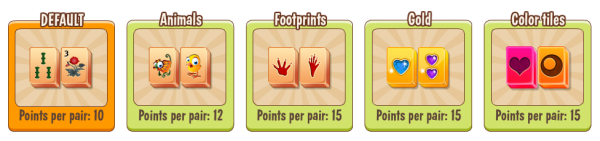
Add a touch of your own style to Mahjong by choosing from several exciting tile designs and backgrounds.
- Choose a tile set in the Store, which awards higher points per pair. Some sets are free! That way you’ll be able to beat your friends and become the Mahjong hero.
- Choose backgrounds with better contrast that suit the tiles of your choice. Higher contrast makes it easier to play, so beating your friends should be easy.
- Magnet tiles: Solve Magnet Tiles to automatically solve the most free pairs with same symbols among themselves.
- Multi-star tile: Solve these tiles to get 2 pairs less from your objective, instead of 1.
- Clock tiles: Special tiles that add 5 seconds to your time when matched.
- Refresh your game by disabling cache and try again
- Send us a technical report and we’ll compensate for your loss until the issue is fixed. Please include in your message if you tried the above suggestions
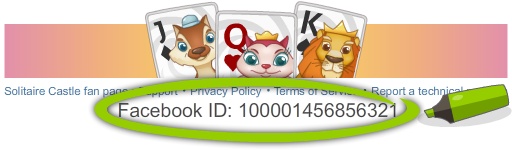
Please open the game and scroll down to the bottom of the page to find it. Send it to us to help us give you the best answer to your question.
Try a different browser (We recommend Firefox or Edge) Clean your cache and try again Send us a technical report and please include in your message if you tried the above suggestions.
Google Chrome:
- On your computer, open Chrome
- At the top right, click More
- Click More tools and then Clear browsing data
- At the top, choose a time range. To delete everything, select All time
- Check the boxes next to “Cookies and other site data” and “Cached images and files”
- Click Clear data
Mozilla Firefox:
- Click the menu button and choose Options
- Select the Privacy & Security panel
- In the Cookies and Site Data section, click Clear Data
- Remove the check mark in front of Cookies and Site Data
- With Cached Web Content check marked, click the Clear button
- Close the about:preferences page. Any changes you’ve made will automatically be saved
Apple’s Safari:
- Select History > Clear History, then click the pop-up menu
- Choose how far back you want your browsing history cleared
If Develop is part of your main navigation:
- Select Develop > Empty Caches
Internet Explorer:
- In Internet Explorer, select the Tools button, point to Safety, and then select Delete browsing history
- Choose the types of data or files you want to remove from your PC, and then select Delete
Microsoft Edge:
-
- To view your browsing history, in your Microsoft Edge browser, select Favorites > History
- Select Clear history
- Choose the types of data you want to remove from your PC. For example, you may want to remove browsing history and cookies, but keep the history for autofill and passwords.
- Select Clear
Unless otherwise stated, we will delete or anonymise your data as soon as it is no longer needed (e.g. your e-mail address after you have unsubscribed from our newsletter). Your data will also be deleted or anonymised automatically, if and when the mandatory storage period expires (e.g. those required by law for payment transactions). Such data may be needed for longer periods of time for legal reasons. You can request information about all personal data we have stored about you.
If you have specific questions about your personal data, deletion of your personal data or similar things, you can contact us via e-mail at info@megazebra.com
At any point, you can contact us if you want your user data deleted. For this, please send an email to info@megazebra.com with your user ID. Your user ID is found underneath the game or in the settings menu.
This is a technical issue related to Facebook. It appears that you have disabled third-party apps on Facebook, which has blocked Mahjong Trails. To resolve the issue, you should enable third-party apps in your Facebook settings. Alternatively, you can play the game on your mobile phone and connect to Facebook. This will unblock your desktop game.
We are sorry for the inconvenience.
Send us a message on our Facebook Page with your Facebook UID and the transactions details and we will get back to you shortly.
It is very simple to buy coins for Mahjong Trails. In the upper left corner, where your current amount of coins is displayed, simply click on the “+”sign and you can see all offers. Select the one that suits you the best and then follow the instructions.
With the new update, you can purchase or spend miles in the Quests/Miles wheel (green airplane icon on the left) to spin the wheel and win boosters. Each spin costs 500 miles.
You can find and claim your gifts in the Message Center, which is represented by the envelope icon in the top-right corner of the screen. You can also send gifts to friends from this same screen. Before you can send gifts, you must first claim your own. To do this, simply click “Accept All.”
Every journey begins with a single step!
Goal: Pack your bags and follow the Mahjong Trails around the world from Rio de Janeiro. Clear all the tiles from the board as fast as possible to solve the levels.
You remove tiles by selecting two free tiles of the same kind (free tiles change color when you click on them with your mouse). A free tile must have at least one side unblocked in order to be matched. In order to unlock the next layout, you have to clear a certain number of tiles of a layout. This way you can travel from one layout to another and from one city to the next.

Hint: get 10 coins for inviting 5 friends (maximum of 25 friends)
You get points:
- by matching pairs of tiles (see the points per pair in the Store)
- for every 10 pairs matched (remaining seconds are added as points)
- after completing a puzzle (remaining seconds are added as points)
Beat your friends’ score and send them a “Challenge”. Playing with and against your friends is so much more fun.
- The magic wand deletes a pair of tiles of your choice. If one tile blocks many others, click on the wand, then on that tile and it will be deleted. When there is a free pair of that tile, the game will highlight it, so you can click on it to delete it too.
- The surprise gift is… well… a surprise. 😉 Click on it to see what you get.
- The 20 seconds can help you solve the layout by increasing the time you have to match pairs. Click on it to activate it and it will be automatically added to your time.
- The undo gifts will cancel the last move and the matched pairs will reappear, in case you want to rethink your strategy.



While playing a layout, you can find some very cool features on the right hand side of the screen.
- The Hint will show you a free pair and it takes 10 seconds from the default time.
- The Highlight hides all blocked tiles so you can see easier the free tiles and match the pairs. It costs 8 coins.
- The Hint Boost shows you a matching pair every 3 seconds. It makes it so easy to win, for only 4 coins.
- The Reshuffle also costs coins, but it can be very useful when you have only a few matches available and you waste time looking for them.
Hint: buy more boosters at a time, to save coins and to easily use them whenever you want.
Quests are special goals in the game that you can complete in order to get boosters to help you progress in the game. The quests can be accessed by clicking the green plane in the left-hand menu.
Earn miles by completing Quests. There are various adventures without any time limit, and only reset when they are all complete. You can spin the wheel for 500 miles per spin to win exciting boosters.
If there are no more available moves, the game will end regardless of time. In that case, you can use/buy a reshuffle.
Here are some hints to help you solve the layout: get more time by adding the “20 seconds” gift and using the “surprise” gift from your friends. Spin the Daily Wheel of Fortune, collect rewards from the Calendar and play Quests to get Miles and exchange them for rewards. Also, check the free offers from Earn Trails Coins then use the coins to activate the features from the right-hand side of the screen. They are very powerful. Don’t forget to follow our Facebook page, we give away gifts and organize contests with coins as reward. Good luck!
This could happen if you chose to continue with your device progress, rather than you Facebook progress. Go to the settings page, and click contact us, so we can set it back for you.
On mobile:
Click the settings gear icon, then the pencil icon under help. Type in your message and we will get back to you as soon as possible.
On computer:
Use the “Report a technical problem” button at the bottom of the page. Type in your message and we will get back to you as soon as possible.
Yes, you can! When you are on your mobile device (phone or tablet), sign in with your Facebook profile and your game progress will be shared across your devices. Connecting your Facebook will also earn you an extra 50 coins! Play whenever and wherever.
The percentage is the number of pairs matched out of the total. It has nothing to do with the score. To play the next layout, match pairs of tiles until you reach the first star on the golden bar above the layout. The points are calculated based on several factors, and they help you increase your total score in order to receive 1 free coin each time you level up. Good luck :)!
If you have at least one golden star for the layout but can’t play the next one, it is very likely that you need a ticket to continue your journey and play the layouts in the next city. Ask 3 friends to help you or use coins to get the ticket and play more layouts.
Most probably you purchased 1 extra minute or an extra reshuffle from the parrot- when it appeared for 10 seconds on the screen while you were playing. If you will provide us your Facebook UID (see the instructions below), we can check and give you the exact answer. Send us a message on our Facebook Page.
It means you played all the available layouts. But don’t worry, we constantly update Mahjong Trails and our team is already working to add more layouts.
Meanwhile, you can keep playing to get all 3 stars in each layout, increase your total score to get a free coin, or beat your friends’ score. The new layouts are awesome, we are sure you will love them.

Play Mahjong Trails now!